1.39 FAQ-155 How do I combine multiple legends into one?
Combine-Multi-Legends
Last Update: 2/12/2018
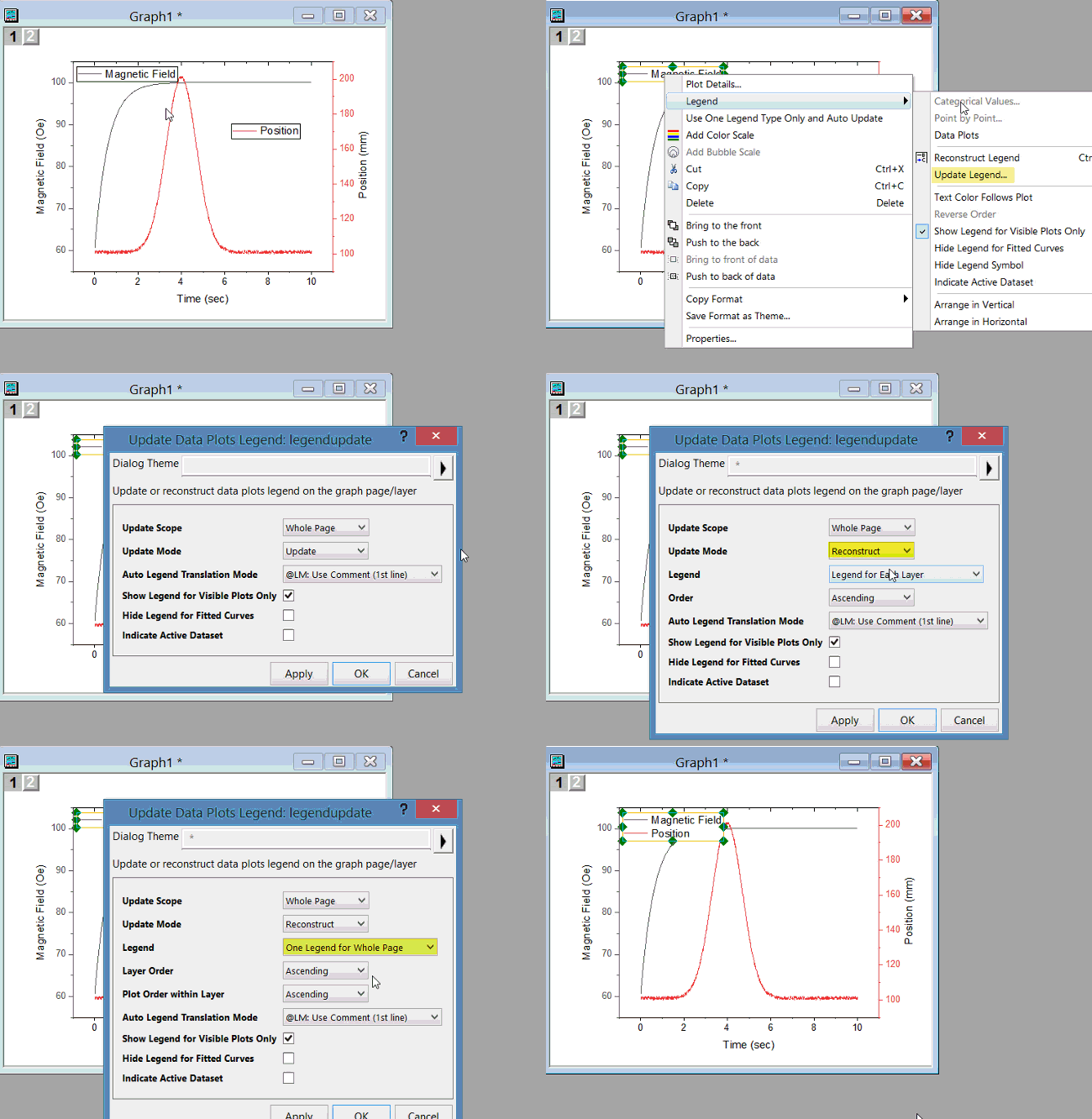
Each layer in a graph has its own legend, but you can create one legend for the entire graph with these steps:
- Select Graph: Legend: Update Legend.
- Select Whole Page for Update Scope dropdown list and set Update Mode to Reconstruct.
- Choose One Legend for Whole Page in the Legend drop-down list.
- Click OK.
Alternatively, you can follow these steps:
- Right-click on the graph and from the context menu choose Plot Details (or Properties).
- In the Plot Details dialog, on the left-hand side of the dialog, select the Graph (the top folder in the hierarchy). On the right-hand side of the dialog, choose the Legends/Titles tab.
- Check the Include Data Plots from All Layers when Constructing Legend checkbox and then click OK. Each legend object on the page, will now display information from all layers.
- You can delete all but one legend.
Keywords:merge, box, single