2.48 FAQ-484 Why does Origin assign Types for Columns and how do I work with column types?
Col-Types
Last Update: 3/16/2020
Each worksheet column can have a Plot Designation that tells Origin how to treat the data when plotting or performing some analyses. Plot Designations are X, Y, Z, Label, Disregard, X Error (bar), Y Error (bar), Group or Subject. These Plot Designations appear enclosed by parentheses in the column heading.
- When a worksheet contains only one X column, Origin creates an association between the X column and all the Y columns to the right of the X column. Thus, when one or more of these Y columns is selected for plotting, Origin uses the associated X column values to create the data plot, even if the X values are not part of the data range selection.
- When a worksheet has multiple X columns, Origin creates the following associations between X and Y columns:
- All Y columns to the right of an X column (up to the next X column) are automatically associated with that X column. Origin denotes the association by designating the first X column as X1, and associated Y columns are designated as Y1. The second X column is designated X2, and associated Y columns are designated as Y2.
- When any Y1 column is selected for plotting, it will automatically plot against the column designated as X1. Similarly, columns designated as Y2 will automatically plot against the column designated as X2.
- One exception exists to this X1Y1, X2Y2 association scheme and that is when plotting simple 2D plots, you are allowed to choose exactly one X column and one Y column (Hint: press CTRL while selecting) in the sheet no matter X is on the left or right side of Y column. Note that this only works for the simplest plot types.
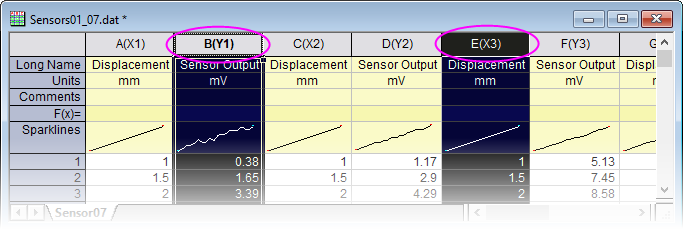
Note that Plot Designations are automatically used when you select columns and choose a plot type from the Plot menu or from a toolbar button; if no data are selected in the worksheet, then the Plot Setup dialog opens. Use the Plot Setup dialog to arbitrarily assign data regardless of Plot Designation.
Keywords:plottable, disregard, error, yerr