1.294 FAQ-1179 How to know the data requirement of Origin build-in graph templates?
Build-In-Graph-Template-Data-Requirement
Last Update: 10/11/2023
Besides checking the document page of that graph type, a more intuitive way to know the data requirement of a graph type is to check the sample project in the Template Library. It provides sample projects for all build-in graph templates.
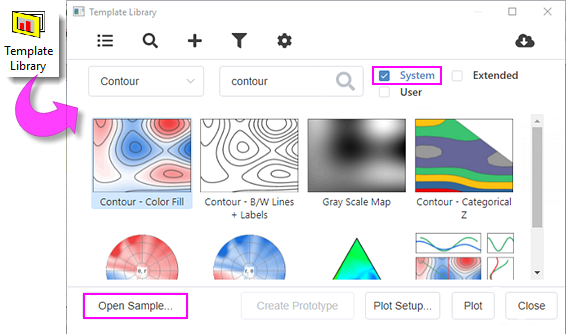
- Select menu Plot: Template Library
- In the Template Library,
- Select category and/or enter the keyword to search for the graph template you want.
- Check System checkbox and clean the other two.
- Click the desired sample graph and click Open Sample... button to open the sample project.
- In the sample project that opens, check the source workbook/matrix book for the data arrange structure of this graph type.
Note: If a type of graph can be plotted from several data arrangement, sample project will list all arrangement separated in different subfolders. For example, contour can be created from XYZ worksheet data, matrix, and virtual matrix, the sample project shows them in three subfolders respectively.
Keywords:data requirement, data structure, data arrangement, graph template, graph type, input data format, source data type