5.92 FAQ-1218 Why Autosave fails to work?
Auto-Save-Not-Work
Last Update: 6/10/2025
We have received reports from Origin 2025 and earlier version users that Autosave failed to work even though Autosave project every x minute(s) (shortened to Autosave below) is enabled in Preferences: Options dialog. We made some improvements and bug fixes in Origin 2025b so autosave works more expectedly. Please upgrade to Origin 2025b if you have autosave issues.
Basic rules of autosave:
- You must dirty the project and x minutes have passed to see the autosaved file under Autosave\ folder.
- Autosaved files will only be kept if Origin crashes or exits without reason (power outage, etc.). If you have manually saved the file, or Origin closes successfully with prompt to save the project, then the autosaved file will be gone.
- To be double safe, if x minutes has passed and you choose not to save the project, Origin still rename the last autosaved file as Last-AutoSave.OPJU under Autosave\ folder. It will not be cleared. This way you get a chance to recover from it. But please note that this will happen every time there is a newer autosaved file and you choose no not to save the project.
Below are detailed cases of the issue. Explanation and workaround is provided in earlier versions.
Project File with OPJ Extension Not Autosaved
Before Origin 2025b, Origin only autosaved project files with new file format (file extension OPJU). Old format project file with OPJ extension would not be autosaved. In Origin 2025b, OPJ file will be auto saved with OPJU extension.
Workaround in Origin 2025 and earlier: After opening your OPJ file, save it as OPJU first.
Project File with OPJU Extension Not AutoSaved
It may be caused by the following reasons:
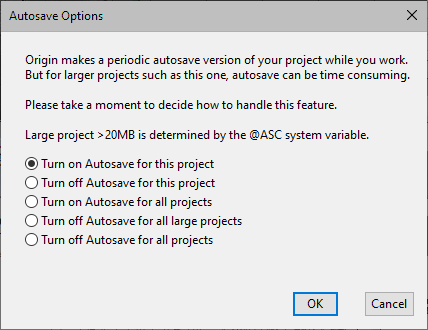
- System variable @ASC specifies the project file size to trigger Autosave reminder. By default @ASC=20 (in megabytes). By default autosave happens silently behind the scene for project file smaller than that. For large project file, when x minute passes, Autosave Prompt will popup to for user to decide autosave or not since it could be time consuming to save large project every x minutes.
- If you sets @ASC=0, which is supposed to open the reminder no matter how small the project size is, somehow it can cause autosave to fail. Workaround before Origin 2025b: Set @ASC bigger than 0.
- Autosave is Turned on for All Projects
The first time the Autosave Prompt shows for large projects, if the 3rd option Turn on autosave for all projects is checked, files bigger than @ASC (default 20MB) will only be autosaved once. And from then on, autosave will stop working for both this project and other large projects. It's not an issue for small project files (size smaller than <@ASC)
- The @ASC checks project size in memory instead on disk. When saving project on disk, the file is compressed. E.g. a project file size may be only 10MB on disk but 20MB in memory. To check project size in memory, open it in Origin. Mouse over the root folder in Project Explorer window. The size in memory will show in tooltip. If size in memory > @ASC and "Autosave is on for all project", the project will fail to be autosaved.
- Workaround before Origin 2025: In Script window, run "doc -cac" to double check Autosave is on for all projects. If so and you do want autosave silently no matter project is big or small, please choose Preferences: System Variables... menu. Set system variable ASC to a big number (more than any project size you may create). E.g. 10000 means 10GB (10000MB). Then any files <=10GB in memory will be autosaved silently every x minutes.
- In Origin 2025b, the bug is fixed so choosing 3rd option will not cause the issue. You can also use new system variable @ASS=1 to turn autosave on for all projects.
Suggestion: If it takes a long time to autosave large project on your PC, please don't set to autosave very frequently, e.g. every 1 minute, etc.
Useful System Variables
The following system variables are added in Origin 2025b to help set and debug autosave issues:
Set @ASM = 1 for debugging. Autosave messages will be shown every few seconds on status bar (at the bottom-left) to tell you if autosave works or fails, something like
Next autosave (sec): 690
autosave done, waiting for changes
When autosave fails, e.g. if @ass=0, open an opju file bigger than @ASC and set @asp=4 to supress the Autosave Options dialog and turn off autosave for large project, The following message dumped to Script window.
Project too large (in memory) for autosave: 21MB
- 0 (default) = Autosave silently for projects smaller than @ASC. For larger files, reminder will show.
- 1 = autosave silently is on for all projects. It's same as choosing the 3rd radio to turn on autosave for all projects in the reminder dialog. And same as setting the following property in older version
SYSTEM.PROJECT.NOAUTOSAVEWITHSIZE = 1 and system.project.NOASKAUTOSAVE = 1
- Autosave Setting in Project
Each project file can have its own autosave settings. Open project file and run @ASP= to check its autosave settings or set it and click save project to save it in the project file.
- 0 (default) = follow global autosave settings @ASS
- 1 = turn off autosave for current project regardless of Preferences: Option's autosave on/off settings.
- 2 = turn on autosave for current project, but still obey the Preferences: Option's autosave on/off settings. And still show reminder if large (>@ASC)
- 4 = Do not show Autosave Options reminder when project size is > @ASC (MB).
Note: The bits can be combined. E.g. set @ASP=6 means turn on the autosave for current project and don't show reminder.
Radio buttons in Autosave Options Reminder
- Turn on Autosave for this project
- Autosave this project silently without reminder. It equals to set @ASP=6.
- Set @asp=0 or run "doc -ca" can trigger the reminder again.
- Turn off Autosave for this project
- Don't autosave this project and no reminder. It equals to set @ASP=5.
- Set @asp=0 or run "doc -ca" can trigger the reminder again.
- Turn on Autosave for all projects
- Autosave all projects silently no matter small or large without reminder. It equals to set @ASS=1
- Set @ass=0 to trigger the reminder again.
- Turn off Autosave for all large projects
- Autosave or not will depend on the project size.
- If the project size in memory < @ASC, autosave.
- If the project size in memory > @ASC, no autosave. If Script window is on, "Project too large (in memory) for autosave: xxxMB" will be dumped there.
- Run "doc -ca" can trigger the reminder again. Or set @ASS=1 and then set @ASS=0 to trigger the reminder.
- Turn off Autosave for all projects
- Autosave is turned off globally. It equals to uncheck Autosave project for every x minutes checkbox in Preferences: Options dialog.
Keywords:big data, large file, auto save, autosave unsaved, backup, save, 20 MB, unsaved, recover