Last Update: 3/29/2023
The Legend object usually contains two columns— the left column with legend symbol (usually same width) and the right column with legend text. By default, the legend symbol widths are the same and aligned, and so, using the Alignment toolbar button or Mini Toolbar only affects the alignment on the legend text column only.
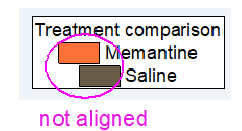
But, if after setting the legend to be center or right-aligned and you notice the legend symbol column isn't aligned, e.g.
then, your legend object is not a "real" legend object. Please try the following steps:


\^() is used as cell anchor, which sets the alignment for the object following on its right. \^(l), \^(c), \^(r) are LEFT, CENTER, and RIGHT alignment, respectively.
In certain situations, a graph needs two legend objects and so a text object is created as a second legend. This second text object should not be renamed to 'Legend' since we don't support duplicate object names in a graph. Since this text object cannot be renamed 'Legend' and inherit its special properties, we must use the cell anchor notation.
If this is the case, please try the following:


See Also: FAQ-829 How can I right-align legend text or arrange the graph legend horizontally?
Keywords:Legend, Alignment, left-aligned, legend symbol