1.117 FAQ-672 After I plot a spline curve, how can I access the spline data?
access-spline-data
Last Update: 12/22/2017
Origin provides several methods for accessing the spline or b-spline data.
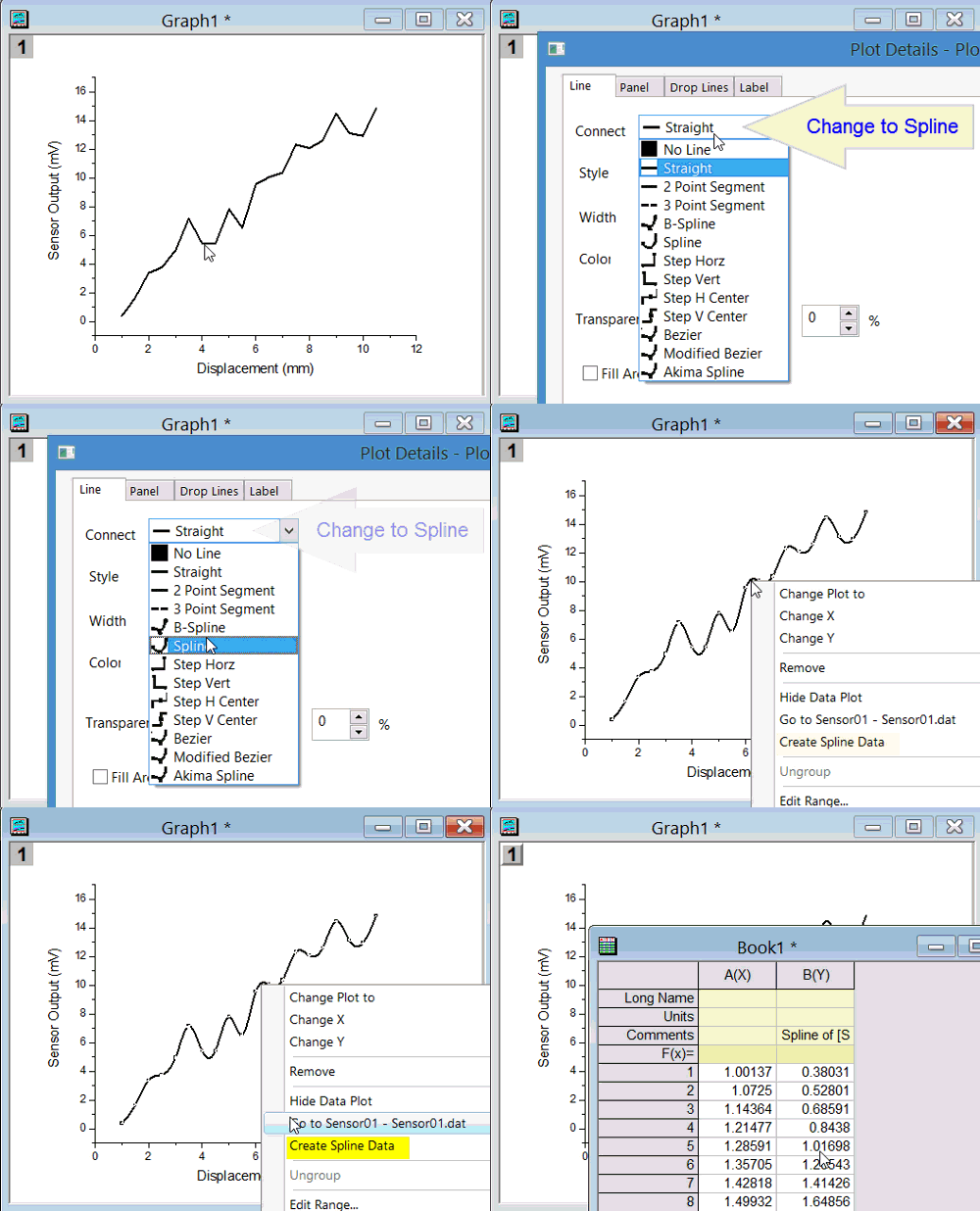
Change Line Connection and Create Spline
- Change line plot connection to Spline.
- Right click the spline line to create spline data.
Interpolation Tool
This tool works for XY data in worksheet or graph window.
- Support you have plotted a line/scatter/line+symbol plot.
- Select Analysis:Mathematics:Interpolate/Extrapolate. Specify the settings in the interplxy dialog box and click OK. You'll now see the spline/b-spline curve added to the graph layer.
- By default the spline data is output to original data sheet with long name: interpolated
Interpolation Gadget
This tool only works for 2D graph window.
- Support you have plotted a line/scatter/line+symbol plot.
- Select Gadgets:Interpolate.
- In the dialog, go to Interpolate/Extrapolate Options tab and change Method to Spline options there and click OK. You'll now see the spline/b-spline curve added to region of interest (ROI) the graph layer.
- You can resize or move the ROI.
- You can click > button and choose New Output to get spline data.
LabTalk Script
- First plot your XY data
- Create a new sheet in same book with two columns.
- By default 1st column should be A(X) and 2nd column should be B(Y). If not, please set them as X and Y.
- Suppose the new sheet is Sheet2 and the book is Book1, Fill col(A) with x values at which you want to find the corresponding spline/b-spline y values.
- Now activate the graph window, and then go to the Script Window (if you need to open it, select Window:Script Window) and type the following command and press Enter:
range r1=[book1]sheet2!1;
range r2=[book1]sheet2!2;
r2=%c(r1)
What this command does is to use the col(A) values as X, then use the internal parameters of the spline/b-spline connection, and generate new Y values for each X value using the spline/b-spline parameters, and places them in col(B). See more here
Keywords:Line Connection Method, Interpolate